
AI has quietly rewritten the rules of smartphone photography. Multi-frame processing, scene recognition, and dedicated night modes now let an ordinary phone produce images that once required experience, big lenses, or a tripod.
These gains come from computational photography — the phone doing as much work in software as the lens and sensor do in hardware. This guide breaks down the main techniques and their trade-offs.
Table of Content
Computational Imaging
Computational imaging means using algorithms to process and improve the raw data coming from a camera sensor. In other words, the camera is as much a small computer as it is a lens and sensor. Modern phones often include specialized processing cores (sometimes called neural engines or ISP — image signal processors) that accelerate these calculations.
The practical payoff is better images in hard situations. Multi-frame photography—taking several frames in rapid succession at slightly different exposures and combining them—reduces noise and helps preserve detail in both shadows and highlights. (Multi-frame photography: multiple quick photos combined to make one better image.)
Other computational tricks include intelligent denoising (removing grain while keeping texture) and exposure fusion (balancing bright and dark areas). These techniques allow phones to brighten dim scenes, reduce motion blur, and yield clearer photos than what the raw sensor could provide alone. This technology is widely described as the backbone of modern smartphone photography (see Android Central for an accessible overview).
Key terms
-
Multi-frame photography: capturing many images in milliseconds and merging them to improve dynamic range and reduce noise.
-
ISO: the sensor’s sensitivity setting; higher ISO amplifies light but also increases noise.
-
HDR (High Dynamic Range): combining exposures to keep both bright highlights and dark shadows readable.
-
Deep Fusion: a device-specific method (example: Apple’s name for a multi-frame, pixel-level optimization process) that merges data to improve mid‑light detail.
Compute and battery trade-offs
Doing this work on-device speeds up results and keeps photos private, but it isn’t free. Heavy computational routines use the phone’s processing cores, which increases power draw and can take longer for complex scenes. Expect a little lag when the camera is producing a long-exposure Night shot or running many alignment passes, and be aware that frequent use of these modes can shorten battery life during long shooting sessions.
AI Scene Recognition
AI scene recognition uses trained models to label what’s in the frame—people, food, landscapes, text—and then applies tailored adjustments. It can boost color for food photos, enhance detail for landscapes, or prioritize accurate skin tones for portraits.
Google’s Real Tone, for example, focuses on better rendering of darker skin tones so the camera doesn’t wash them out. Identification can go beyond broad categories: some systems identify breeds of dogs or types of flowers and offer contextual suggestions or metadata. Reporters at Popular Photography describe how scene-aware processing turns a camera into an adaptive tool rather than a static recorder.
Examples (product-feature names mentioned in this article): Google’s Real Tone, Apple’s scene and portrait tuning, and other vendor scene-recognition features.
AI-assisted HDR
HDR (High Dynamic Range) merges several exposures so a final image retains detail in both bright and dark parts of the scene. AI-assisted HDR adds intelligence: it detects motion, decides which areas to prioritize, and blends frames to minimize artifacts such as ghosting.
Google’s HDR+ is a concrete example: it reduces motion blur, suppresses noise, and merges frames intelligently so bright skies don’t blow out while shadow detail remains visible. Coverage of this approach and its benefits can be found at Android Central.
Examples: Google’s HDR+, Apple’s Smart HDR (device-specific names are useful reference points when you want to try features yourself).
Night Mode
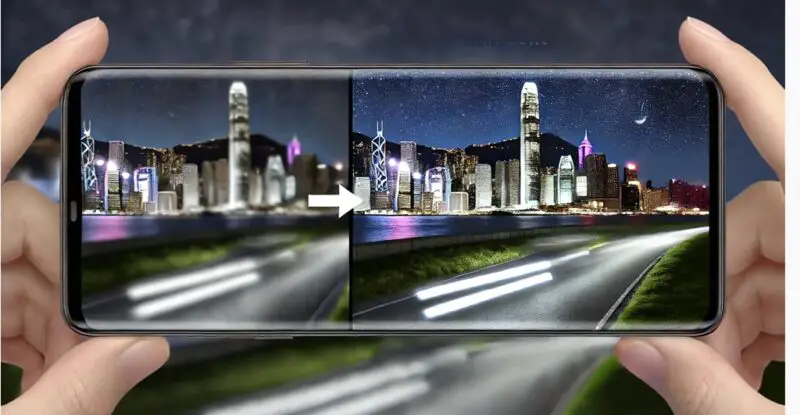
Night Mode is a focused application of computational imaging but with its own constraints and tricks. Where general computational imaging balances exposures across a scene, Night Mode often uses long, careful exposure stacking and stabilization to pull light from very dark environments.
Night-mode workflows typically capture a sequence of frames with varied ISO and shutter timing, then align and merge them. Alignment compensates for the small movements from handheld shooting; stacking increases signal (light) while averaging out random noise. Some implementations add motion detection and selective deghosting to avoid blur from moving subjects.
Products like Google’s Night Sight and Apple’s low-light modes add device-specific optimizations: handheld compensation, selective sharpening, and even an astrophotography mode that takes many aligned frames over a longer period to capture stars while correcting for the Earth’s rotation. Popular Photography discusses how these choices make nighttime photography possible without tripods or specialist gear.
Examples: Night Sight, Deep Fusion (for low and mid-light), and vendor astrophotography modes.
Challenges and Ethical Considerations
Powerful image processing leads to new questions about authenticity: when does a heavily processed photo stop being a faithful record and become an interpretation? That matters for journalism, legal evidence, and personal trust. Specific worries include undisclosed synthetic content, misattribution of authorship, and hidden manipulation steps.
What does “transparency” mean in practice? Two concrete elements are:
-
Disclosure of processing steps: stating if a photo was synthesized, heavily AI-processed, or had elements added—ideally via metadata that survives export and sharing.
-
Ownership provenance: clear markers for what was captured by the sensor versus what was generated or altered by algorithms, so creators and subjects know who owns which parts of an image.
These aren’t abstract concerns. Professional organizations and commentators have flagged them: readers can find discussion and reporting on the ethics and impacts at Tech Xplore and The Hindu. Those pieces underline why photographers and platforms must be deliberate about labeling and policies.
Conclusion
AI-driven computational imaging has expanded what smartphones can capture: more dynamic range, cleaner low-light images, intelligent scene adjustments, and useful feature labels. At the same time, the work happens behind the scenes, bringing trade-offs—processing time, battery use, and questions about how much software should shape reality. AI is reshaping other genres too; explore how merging AI and drone photography opens new perspectives.
Key takeaways: use HDR modes for scenes with bright and dark areas, try Night Mode when light is scarce (but expect longer processing and higher battery drain), and appreciate scene recognition for quick improvements but double-check for accuracy when details matter.
Practical tips:
-
Try HDR for high-contrast scenes to keep both highlights and shadows visible.
-
Enable Night Mode in low light; allow the phone a second or two to process the stack for the best result.
-
Trust scene recognition for convenience, but review results when skin tones or critical details matter.
Sources (linked to the claims they support)
-
What is computational photography? It’s the magic behind your phone’s camera | Android Central (supports Computational Imaging, HDR and HDR+ discussion)
-
You’re already using computational photography, but that doesn’t mean you’re not a photographer | Popular Photography (supports scene recognition and Night Mode examples)
-
The camera never lied… until AI told it to | Tech Xplore (supports ethics and authenticity claims)
-
Smartphone Camera AI: Companies compete to enhance photography experience | The Hindu (supports discussion of industry competition and ethical concerns)
Give these features a try on your own device and notice how the camera chooses to interpret the scene. Keep an eye on what the software is doing behind the shutter. The same AI revolution is transforming how we edit photos after the shot, too.